Connect your app and list models
In Connected apps and API keys, choose Claude Code or Codex. Copy the command and run it in a terminal in your project folder.
For Claude Code, run claude in the same folder. Enter /mcp, select your Tacu server, and choose Authenticate. For Codex, run codex mcp login tacu if adding the server didn’t prompt you to sign in. After you approve in the browser, run codex in the same folder to open a conversation.
Check the workspace name in the browser. If you have more than one, choose the one you want. Approve model read access, then send the prompt below in your connected app. Listing models is free.
List video models
Show me the video models available in Tacu.Make a video
Use Create for individual image, video, or audio files. For independent shots, you can generate several in parallel after reviewing a quote for each. Start a Studio project to review a storyboard, edit shots, and export a finished MP4.
In Claude Code, send the story below first. If Tacu asks for more access, reauthenticate the server from /mcp, then continue the same task. In Codex, run the command below with your existing server name. Include any scopes you want to keep. After approval, run codex in the same project folder to open a new conversation.
bash
codex mcp login tacu --scopes models:read,projects:read,projects:write,generations:writeStart a Studio project
At a rainy bus stop before dawn, a driver finds a paper boat and returns it to a child. Make this a 30-second Tacu Studio project. Send me the project link and wait for my approval after each quote.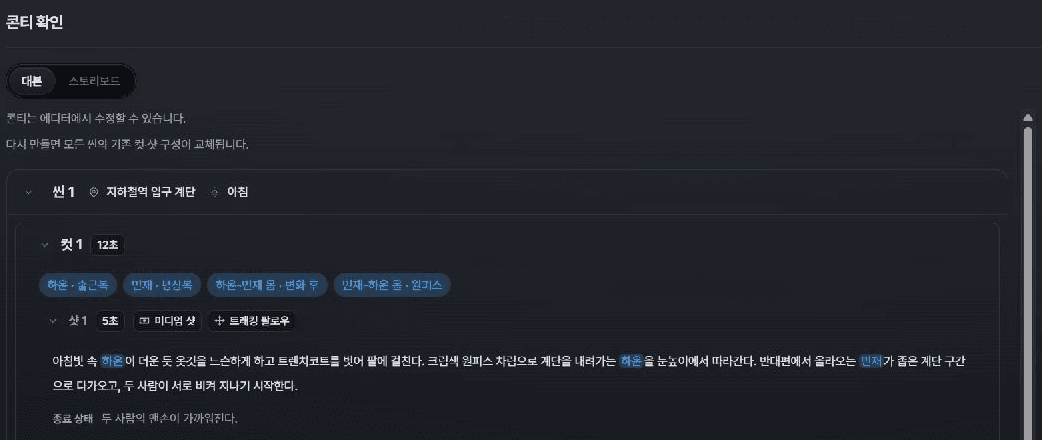
Approve a new take
Open the project link from the chat to follow progress in your browser. Once the storyboard is ready, review the shots, durations, and quote before approving video generation. Refresh the tab if it still shows an earlier stage.
This exchange is translated from a Korean test session. The video was 30 seconds long. The quote of 1,684 credits was for one new take of its second shot.
Claude Code One new take of the second shot is estimated at 1,684 credits. I haven’t generated it or spent any credits yet.
Tester Make one new take using references, up to 1,684 credits. Select it for the second shot when it’s ready. Keep the first shot and the previous take.
Claude Code The new take (version 2) is ready and selected for shot 2. The first shot and the previous take are still there.
Revise one shot
For the shot where the driver hands over the paper boat, move closer to their hands. Keep the existing take and quote me one new take before generating it.Download your files
Export the current edit as an MP4 at the project’s original size. Download all the originals, including reference images and earlier takes. Send me the project link and tell me where you saved the files.Use a script and an API key
To call Tacu from your code, create an API key in workspace settings. Try the model-list request in the reference to check your connection.